Checkout Slots
Checkout slots are containers available in the checkout flow where you can render your UI components. These slots allow you to add custom content at specific points in the checkout process.
Available Slots
These are the slots that are available in checkout:
| Slot | Page |
|---|---|
| before_main_content | start, payment |
| after_main_content | start, payment |
| after_header | start, payment |
| after_line_items_price | start, payment |
| before_line_items | start |
| after_line_items | start, payment |
| after_contact_form | start |
| after_address_form | start |
| after_billing_form | start |
| after_payment_options | payment |
| before_payment_options | payment |
| before_address_form | start |
| before_billing_form | start |
| before_contact_form | start |
| before_shipping_form | start |
| after_shipping_form | start |
| after_shipping_description | start |
| before_order_number | success |
| after_order_number | success |
| before_order_summary | success |
| after_order_summary | success |
Visual Reference
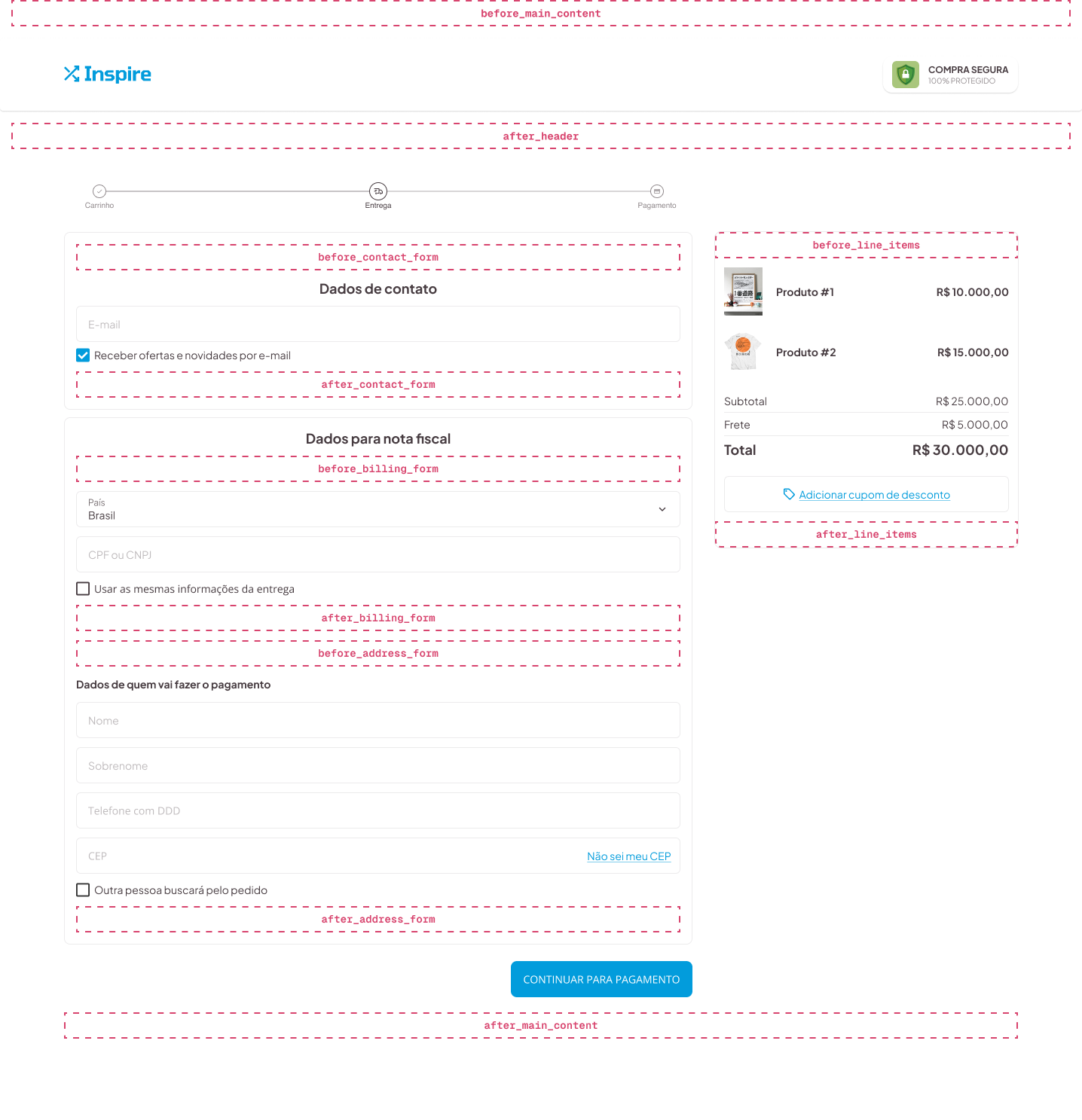
Desktop Layout
This is the usual location of checkout slots on desktop:
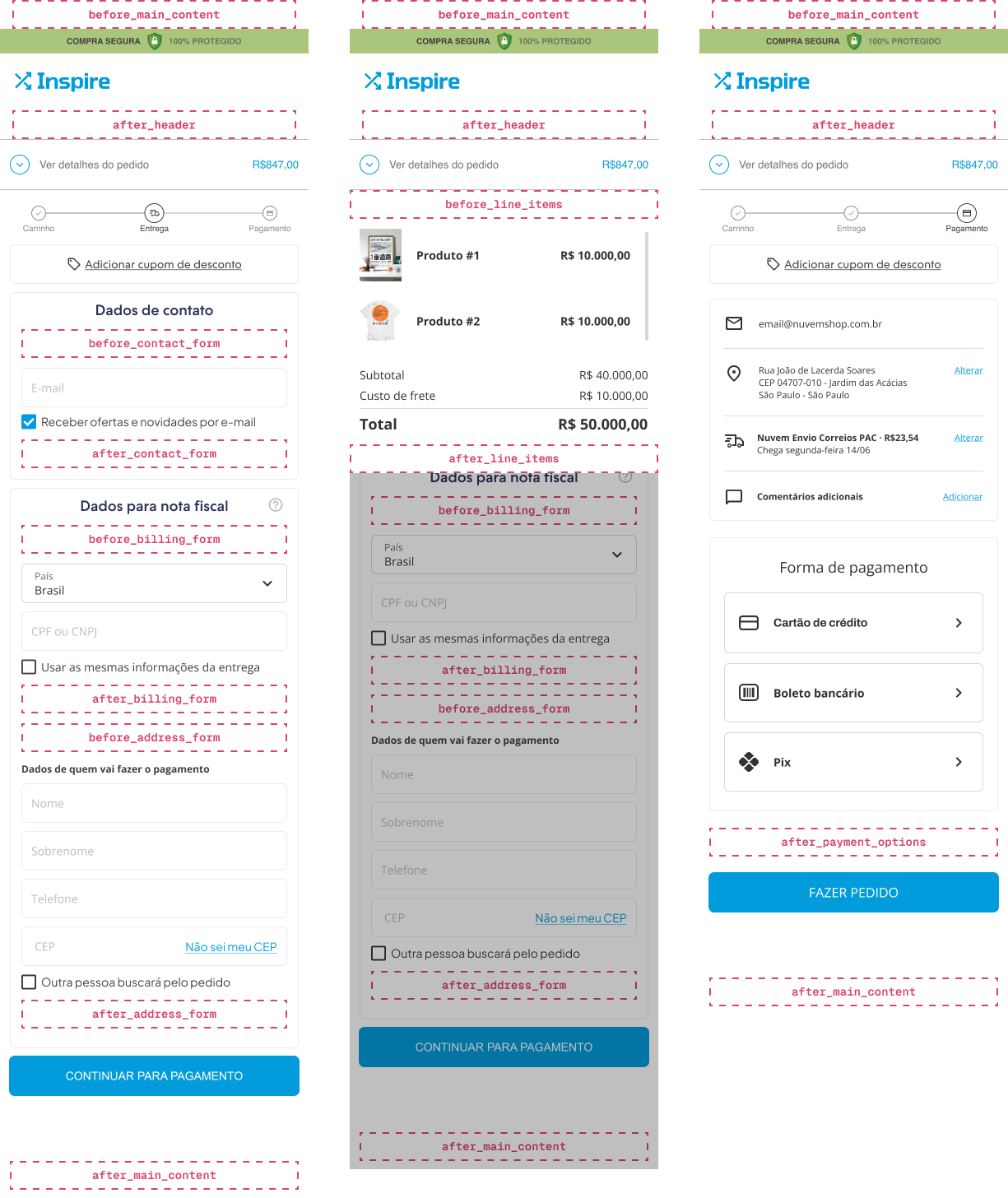
Mobile Layout
And this is their usual location on mobile devices:
Examples
Shipping Options Slot
The after_shipping_description slot allows you to add custom content after the shipping method description in the checkout page.
import type { NubeSDK } from "@tiendanube/nube-sdk-types";
import { Text } from "@tiendanube/nube-sdk-jsx";

export function App(nube: NubeSDK) {
  nube.render("after_shipping_description", [
    <Text key="ne-correios-pac">This is a custom shipping description</Text>,
  ]);
}
Adding Content Before Payment Options
import type { NubeSDK } from "@tiendanube/nube-sdk-types";
import { Box, Text } from "@tiendanube/nube-sdk-jsx";

export function App(nube: NubeSDK) {
  nube.render("before_payment_options", [
    <Box key="payment-notice">
      <Text>Please review your order before selecting a payment method.</Text>
    </Box>,
  ]);
}
Adding Content After Contact Form
import type { NubeSDK } from "@tiendanube/nube-sdk-types";
import { Box, Text } from "@tiendanube/nube-sdk-jsx";

export function App(nube: NubeSDK) {
  nube.render("after_contact_form", [
    <Box key="contact-info">
      <Text>We'll send order updates to this email address.</Text>
    </Box>,
  ]);
}
Order Confirmation Slots
The before_order_number, after_order_number, before_order_summary, and after_order_summary slots are available on the success page (the order confirmation page shown after the order is placed). Use them to add custom content around the order number and the order summary.
import type { NubeSDK } from "@tiendanube/nube-sdk-types";
import { Box, Text } from "@tiendanube/nube-sdk-jsx";

export function App(nube: NubeSDK) {
  nube.render("after_order_number", [
    <Box key="order-thanks">
      <Text>Thank you! Keep your order number handy for tracking.</Text>
    </Box>,
  ]);

  nube.render("after_order_summary", [
    <Box key="order-followup">
      <Text>Follow us on social media for exclusive offers.</Text>
    </Box>,
  ]);
}
Best Practices
- Use descriptive
keyprops for all components rendered into slots - Consider mobile and desktop layouts when positioning content
- Keep content concise and relevant to the checkout context
- Test your components on different screen sizes
- Clear slots when they're no longer needed using
nube.clearSlot()
Help us improve NubeSDK
Found an issue or have a suggestion? Let us know on GitHub.