Mandatory Requirements
Mandatory Requirements for App Approval
To ensure an effective approval process, it is mandatory for partners to submit the following items for platform analysis. These elements are essential to validate the app's functionality and compliance with the established guidelines.
Once the approval request is submitted, our team will contact you to request the artifacts covering the following requirements:
1. Submission of Sequence Diagram
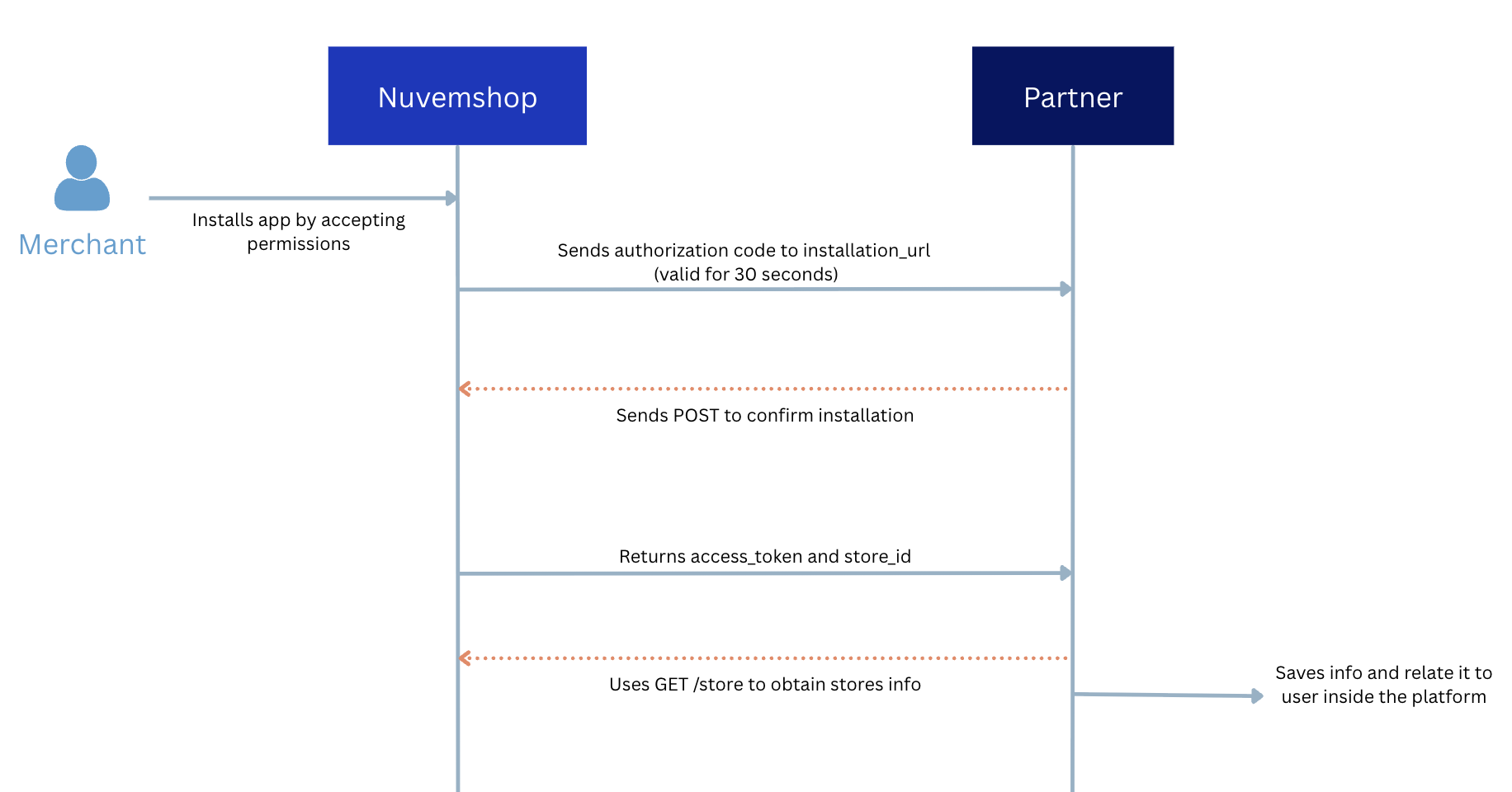
The sequence diagram must illustrate how the application interacts with our API and which actions it executes on the back-end. The diagram should show which actions are triggered during an interaction with the Nuvemshop API, what happens during the transaction, and what the resulting output is.
It allows us to validate the authentication flows and the technical interaction between the app and our platform.
Objectives of the sequence diagram
1.1. Ensure that applications use resources efficiently, for example:
- Avoiding continuous GET requests on an entity to check for changes when the correct approach would be to listen to a Webhook.
- Avoiding unnecessary entity modifications (e.g., an app that constantly changes product stock to 0 and immediately updates it to another value).
1.2. Identify opportunities for improvement in the partner's workflow:
- Building a more robust application with fewer failures.
- Improving your application's efficiency.
- Detecting potential security vulnerabilities.
Example of an application installation flow:
2. Submission of App Demo Video
The demonstration video is one of the fundamental pillars for your application's approval. It serves two critical roles in our review process:
2.1. Evaluation Criteria:
It is through this video that our team validates whether the technical and business flows are operating according to the required quality standards.
2.2. Usability Guide:
The video serves as the official roadmap for our team to test the user journey, ensuring the merchant experience is intuitive and friction-free.
Ensure the video is clear and covers all the points listed below.
Incomplete videos may result in the approval process being sent back for corrections.
The app demonstration video must include the following scenarios:
- App installation from Nuvemshop and not via the app panel.
- To simulate this scenario, use the URL:
https://www.tiendanube.com/apps/(app_id)/authorize. - Replace
(app_id)with your app’s ID, available in the partner panel.
- To simulate this scenario, use the URL:
- Registration of a user who doesn’t yet have an account.
- Demonstration of login for an already registered user.
- Scenarios involving app reinstallation and behavior after removal and reinstallation.
- Simulation of all scenarios described in the sequence diagram, ensuring that all permissions and flows are clearly defined.
- App usage flow, showing the main features provided.
- Relevant points for evaluation, such as specific interactions essential for approval.
- If any technical setup is required to use the app, it’s recommended to clearly specify and guide the merchant on how to perform it.
3. Attention to Subscription Steps and Restrictions
If your app includes a subscription plan, or if a waiting period is needed for registration approval or any other step that could prevent immediate validation,
provide a demo account that has already bypassed these steps, allowing the approval team to access and validate without interruptions to the process.
To ensure a fast-track approval, please inform us in advance about any flows that require activation lead times or plan subscriptions, which will need to be flagged for our team to bypass or activate.
It is essential that our team experiences the actual merchant journey during the entire installation and application configuration process.
4. NubeSDK Usage
Starting on June 5, 2026, the app must be built using the NubeSDK. Apps submitted for homologation after that date will not be approved without the SDK.
- Effective date: June 5, 2026.
- Applies to: new homologation submissions from that date onward.
- How to prepare: check the NubeSDK Migration Guide if your app still relies on the legacy model (
document,window, jQuery, or direct DOM manipulation).
For more context on the deadline, see the Applications overview and the Homologation overview .
Submitting these requirements correctly will ensure a faster, more efficient approval process, allowing your app to move forward to the publishing phase without setbacks.