Popover
A popover is a floating container whose content becomes visible when its trigger button is clicked.
It's useful for displaying contextual information, menus, or actions without navigating away from the current view.
The popover is a compound component composed of Root, Button, and Content subcomponents.
Usage
import type { NubeSDK } from "@tiendanube/nube-sdk-types";
import { Popover, Text } from "@tiendanube/nube-sdk-jsx";
function MyComponent() {
return (
<Popover.Root>
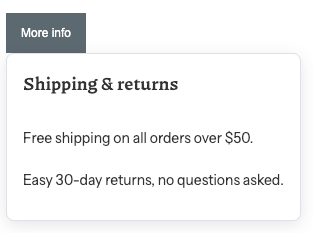
<Popover.Button variant="primary">More info</Popover.Button>
<Popover.Content
padding={16}
gap={8}
width="260px"
background="var(--main-background)"
borderRadius={8}
>
<Text heading={4} modifiers={["bold"]}>
Shipping & returns
</Text>
<Text>Free shipping on all orders over $50.</Text>
<Text>Easy 30-day returns, no questions asked.</Text>
</Popover.Content>
</Popover.Root>
);
}
export function App(nube: NubeSDK) {
nube.send("ui:slot:set", () => ({
ui: {
slots: {
after_product_description: <MyComponent />,
},
},
}));
}
Open by default
Use the defaultOpen property on Popover.Root to render the popover with its content already visible.
<Popover.Root defaultOpen>
  <Popover.Button variant="secondary">Promotion</Popover.Button>
  <Popover.Content>
    <Text>Use the code WELCOME10 to get 10% off.</Text>
  </Popover.Content>
</Popover.Root>
Custom trigger with asChild
By default Popover.Button renders its own button element. Set asChild to merge the trigger
behavior onto a single custom child element instead, letting you use any component as the trigger.
<Popover.Root>
  <Popover.Button asChild>
    <Link>Need help?</Link>
  </Popover.Button>
  <Popover.Content>
    <Text>Contact our support team at support@example.com.</Text>
  </Popover.Content>
</Popover.Root>
Positioning
The popover positions its content automatically — there are no placement props to configure:
- Desktop: the content is anchored to the trigger and is right-aligned by default (its right edge lines up with the trigger, growing leftward). It automatically flips to left-aligned when right-alignment would overflow the left edge of the viewport.
- Mobile (narrow viewports): the content is presented as a bottom sheet instead of an anchored panel.
You can still pass the style prop on Popover.Content for advanced overrides, but it's not required for normal use and may interfere with the automatic alignment.
Subcomponents
Popover.Root
The root container that wraps the trigger and content and controls the popover's visibility.
| Property | Type | Required | Description |
|---|---|---|---|
| children | NubeChildrenComponent | No | The Popover.Button and Popover.Content elements. |
| defaultOpen | boolean | No | Whether the popover is open on initial render. |
| style | StyleSheet | No | Custom styles for the popover root. |
| id | string | No | Optional unique identifier for the component. |
Popover.Button
The trigger that toggles the visibility of the popover content. It inherits the style and props of the
Button component, except for onClick, which is managed
internally to control the popover.
| Property | Type | Required | Description |
|---|---|---|---|
| children | string | No | Text or content of the trigger button. |
| asChild | boolean | No | When true, merges the trigger behavior onto a single custom child instead of rendering its own button. |
| disabled | boolean | No | Whether the button is disabled. |
| variant | "primary" "secondary" "transparent" "link" | No | Button style variant. |
| width | Size | No | Width of the button (e.g., "100%", "200px"). |
| height | Size | No | Height of the button. |
| style | StyleSheet | No | Custom styles for the button. |
Popover.Content
The floating container that holds the content shown when the popover is open. It inherits the style and props of the Box component and uses theme variables for its default background, border, and box shadow.
| Property | Type | Required | Description |
|---|---|---|---|
| children | NubeChildrenComponent | No | Content to be displayed when the popover is open. |
| width | Size | No | Width of the content (e.g., "100%", "200px"). |
| height | Size | No | Height of the content. |
| margin | Size | No | Outer spacing around the content. |
| padding | Size | No | Inner spacing of the content (e.g., "16px"). |
| gap | Size | No | Spacing between child elements (e.g., "1rem"). |
| borderRadius | Size | No | Border radius of the content (e.g., "8px"). |
| background | string | No | Background color (can be a CSS variable like "var(--primary-color)"). |
| color | string | No | Content color (can be a CSS variable like "var(--primary-color)"). |
| alignItems | FlexItems | No | The CSS property align-items |
| alignContent | FlexContent | No | The CSS property align-content |
| justifyContent | FlexContent | No | The CSS property justify-content |
| direction | "row" "col" | No | Layout direction for children (row for horizontal, col for vertical). |
| style | StyleSheet | No | Custom styles for advanced overrides. Not required for normal use, and may interfere with the automatic positioning. |
| id | string | No | Optional unique identifier for the component. |
Help us improve NubeSDK
Found an issue or have a suggestion? Let us know on GitHub.