Mandatory requirements
1. Application images
- Upload the app promotional images in "Application images", which will only be approved if they are in the correct requested dimensions
- It will be necessary to upload a specific image package for each country of operation, such as Brazil, Mexico, and Argentina.
These images must show the app screens and promote its main features, sparking the merchant's interest in installing it.
2. Application icon
Upload the app icon in "Icon", which will only be approved if it is in the correct requested dimensions. This image will be your app logo.
- Allowed formats: JPEG and PNG
- GIFs are not supported
- Quantity: minimum 3 and maximum 5
3. Billing model
- In "App store languages" select the country where the app will be published to then fill in all requested fields.
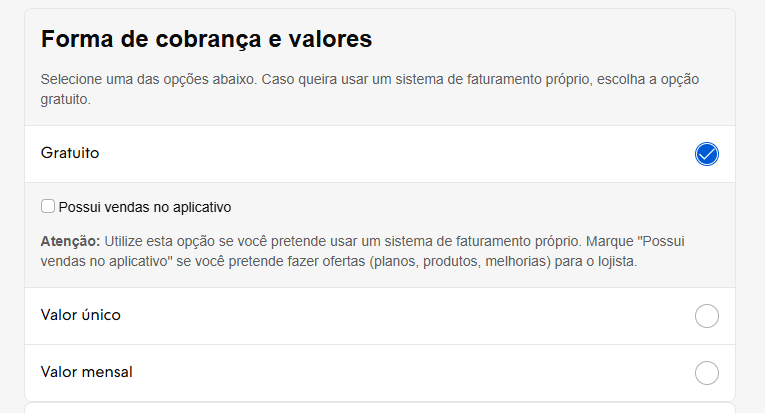
- Select in "Billing model" the type of billing that will be used:
- Free (partner's own billing with or without the option to have "In-app sales")
- One-time fee (Nuvemshop billing, one-time fee)
- Monthly fee (Nuvemshop billing, monthly fee)
4. App profile description
- In "Information" fill in the app description fields. This is the most important part! The information in the "short" and "long" description fields will be your app's showcase in the App Store, what merchants will see and what will encourage them to install it.
Nuvemshop created a guide so your description has as many keywords as possible, ensuring a good return in the App Store search field when the merchant searches for a feature or need that your app solves. Use exactly this structure:
App profile description
Complete App Description Template - Nuvemshop
App name: App "X"
Short description field: [Insert a description that summarizes your app's function]. Example: Cheaper shipping with the best carriers in the country.
Full description field
- Introduction:
Make your app's value proposition and market differentiator clear. This way, the merchant will be interested in continuing to read.
Example: “App X is the solution for digital entrepreneurs who need cheaper and more flexible shipping in their online store. Have full integration with Correios and the main carriers in the country without needing a contract. Also count on exclusive features such as shipping quote, label generation, and pickup scheduling.”
If you want, you can insert a short video presenting the app. Audiovisual media enriches your page and encourages the user to stay longer on the page.
- What is App X?
Get straight to the point, explain what your app does and the impact/ease it brings to the merchant.
Example: “App X is an app developed by [company name] to facilitate the integration of your Nuvemshop online store with several Brazilian carriers. You only need to install the app to gain access to countless shipping options and find faster and cheaper solutions to ship your products.”
- How does App X work?
Be direct and use bullet points to make reading and understanding easier. Example: “App X connects your online store to carriers throughout the national territory, with coverage for more than 3 thousand municipalities.”
- You have the option to schedule pickups and also configure reverse logistics.
- Allowed shipments must have dimensions up to 80 cm x 80 cm x 80 cm and weight up to 30 kg. Check the coverage area at this link.
- What are the features of App X?
Be direct and use bullet points to make reading and understanding easier. Example: “App X offers the following features:”
- Search for carriers according to product and delivery profile;
- Direct integration with shipping rate tables;
- Creation of cheaper shipping and free shipping promotions;
- Label generation;
- Automatic sending of shipping and delivery emails;
- Online shipment tracking.
- Advantages of installing App X
Be direct and use bullet points to make reading and understanding easier. Example: “You have the following advantages when installing App X in your Nuvemshop:”
- Cheaper and more competitive shipping;
- Centralization of all logistics activity in a single app;
- Shipment tracking at all shipping stages;
- Greater coverage in Brazil for logistics operators;
- Simplified shipping calculation in your online store.
- Plans and Prices for Nuvemshop merchants
If possible, detail the plans and prices, as well as specific offers for Nuvemshop customers.
Example: “You can try App X for free for 30 days and choose among the following plans:”
- Essential for R$ 59/month;
- Control for R$ 99/month;
- Complete for R$ 199/month.
See more details about plans and prices at this link.
- How to integrate App X with Nuvemshop?
Present a summary of the step-by-step process to install the app.
Example: “To integrate App X with your Nuvemshop store, just follow the steps below:”
- Click on “Install App”;
- Accept the app permissions;
- Create an account in App X;
- Validate the code in your Nuvemshop panel;
- Done! You can now use App X to get cheaper shipping.
If you have questions, check the step-by-step on how to install App X. (Link)
- Merchant support
Provide all support channels, as well as response SLA and service hours. Example: “If you have questions, contact us through the following service channels:”
- By email suporte@app.com.br — average response time of 24 hours;
- Online chat on the website — Monday to Friday from 9am to 6pm and Saturdays from 9am to 3pm;
- WhatsApp at number xx-xxxx-xxxx — Monday to Friday from 9am to 6pm and Saturdays from 9am to 3pm;
- Phone xx-xxxx-xxxx — 24-hour service.
⭐ Best practices for these entries
Follow exactly the structure of the app description Guide above.
You also have the option to use the Nuvemshop Artificial Intelligence Agent "App Description Generator in the Nuvemshop App Store" to help you create this complete description in an easy and quick way.
- Access the ChatGPT agent "Nuvemshop Appstore Description Generator " by clicking the link to start the interactive generation of the long description.
- Define information sources: enter your app's official website URL, links to Help Center articles or tutorials and/or upload a document (PDF or DOCX) with an overview of the features, ensuring coverage of all guide blocks (objective, benefits, features, etc.).
- Specify publication regions and particularities: inform the countries where the app will be available and detail possible feature differences by region (for example, tax module active only in Chile), so the agent can adapt the content properly.
5. FAQs (Frequently Asked Questions)
It is mandatory to provide the Nuvemshop team, at the homologation stage along with the other shared artifacts, the FAQ document with the most frequent questions about your app.
Pay special attention to support contacts (level 1, level 2, technical and commercial) and the availability of test accounts.
Nuvemshop created a template for each category for standard use that you must use as a guide.
- The questions in the FAQ document must vary according to your app's category.
- Copy the template document listed below and share it together with your homologation request.
▶️ ERP FAQs Template FAQ ERP
▶️ Payment Method FAQs Template FAQ Payments
▶️ Logistics Method FAQs Template FAQ Shipping
▶️ Marketing and other categories FAQs Template FAQ Marketing and other categories