Form
The Form component is a compound component for building declarative forms whose submission is handled on the main thread. The worker only describes the form — on submit, the host adapter builds a FormData from the descendant fields, calls fetch(target, { method, body }), and dispatches the outcome back through onSuccess / onFail.
It is composed of the following subcomponents:
| Component | Description |
|---|---|
Form.Root | Root of the form, with endpoint settings and listeners for the main events. |
Form.Field | Input that supports several types (text, email, tel, number, file). |
Form.FieldError | Inline validation "hint", based on the browser's native Constraint Validation API. |
Form.Select | Dropdown with built-in validation. |
Form.Radio | Radio group with built-in validation. |
Form.Checkbox | Checkbox with built-in validation. |
Form.Resetter | Button that clears/cancels the form. |
Form.Submitter | Submits the form on user click. |
Form.Success | Conditional block of visual feedback for a successful submission. |
Form.Failure | Conditional block of visual feedback for a failed submission. |
Form.Sending | Conditional block of feedback while the front end communicates with the form API. |
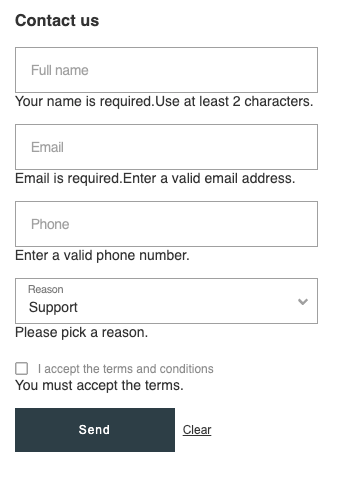
Usage
import { Box, Form, Text } from "@tiendanube/nube-sdk-jsx";
import type { NubeFormData, NubeSDK } from "@tiendanube/nube-sdk-types";

/**
 * Example exercising the new `Form` compound component of the Nube SDK.
 *
 * It declares a contact form whose submission is handled on the main thread:
 * on submit the host adapter builds a `FormData` from the descendant fields,
 * calls `fetch(target, { method, body })`, and reports the outcome back
 * through `onSuccess` / `onFail`. The form shows every subcomponent:
 * `Field` (+ inline `FieldError`), `Select`, `Checkbox`, `Submitter`,
 * `Resetter`, and the conditional `Sending` / `Success` / `Failure` blocks.
 */
function ContactForm() {
  return (
    <Form.Root
      method="POST"
      target="https://httpbin.org/post"
      onChange={(event) => {
        const data = JSON.parse(event.value ?? "{}") as NubeFormData;
        console.log("form changed", data);
      }}
      onSuccess={(event) => console.log("submit ok, status:", event.value)}
      onFail={(event) => console.log("submit failed:", event.value)}
    >
      <Text heading={3} modifiers={["bold"]}>
        Contact us
      </Text>

      <Form.Field type="text" name="name" label="Full name" required minLength={2}>
        <Form.FieldError match="valueMissing">Your name is required.</Form.FieldError>
        <Form.FieldError match="tooShort">Use at least 2 characters.</Form.FieldError>
      </Form.Field>

      <Form.Field type="email" name="email" label="Email" required>
        <Form.FieldError match="valueMissing">Email is required.</Form.FieldError>
        <Form.FieldError match="typeMismatch">Enter a valid email address.</Form.FieldError>
      </Form.Field>

      <Form.Field type="tel" name="phone" label="Phone" pattern="[0-9 +()-]{6,}">
        <Form.FieldError match="patternMismatch">Enter a valid phone number.</Form.FieldError>
      </Form.Field>

      <Form.Select
        name="reason"
        label="Reason"
        required
        options={[
          { label: "Support", value: "support" },
          { label: "Sales", value: "sales" },
          { label: "Feedback", value: "feedback" },
        ]}
      >
        <Form.FieldError match="valueMissing">Please pick a reason.</Form.FieldError>
      </Form.Select>

      <Form.Radio
        name="contact_preference"
        label="Preferred contact"
        required
        options={[
          { label: "Email", value: "email" },
          { label: "Phone", value: "phone" },
        ]}
      >
        <Form.FieldError match="valueMissing">Please pick a contact preference.</Form.FieldError>
      </Form.Radio>

      <Form.Checkbox name="terms" label="I accept the terms and conditions" required>
        <Form.FieldError match="valueMissing">You must accept the terms.</Form.FieldError>
      </Form.Checkbox>

      <Box direction="row" gap="8px">
        <Form.Submitter variant="primary">Send</Form.Submitter>
        <Form.Resetter variant="secondary">Clear</Form.Resetter>
      </Box>

      <Form.Sending>
        <Text>Sending your message…</Text>
      </Form.Sending>

      <Form.Success>
        <Text modifiers={["bold"]}>Thanks! We received your message.</Text>
        <Form.Resetter variant="link">Send another</Form.Resetter>
      </Form.Success>

      <Form.Failure>
        <Text>Something went wrong. Please try again.</Text>
        <Form.Resetter variant="link">Try again</Form.Resetter>
      </Form.Failure>
    </Form.Root>
  );
}

export function App(nube: NubeSDK) {
  nube.render("after_line_items", <ContactForm />);
}
Subcomponents
Form.Root
The root container that declares the form, its submission endpoint, and the listeners for the main events. On submit, the adapter builds a FormData, calls fetch(target, { method, body }), and reports the result through onSuccess / onFail.
| Property | Type | Required | Description |
|---|---|---|---|
| target | string | Yes | Destination URL for the submission. |
| method | "GET" | "POST" | "PUT" | "PATCH" | "DELETE" | No | HTTP method used for the submission. Defaults to "POST". |
| onChange | NubeComponentFormRootEventHandler | No | Fires after every change event from a descendant field (see below). |
| onSuccess | NubeComponentFormRootEventHandler | No | Called after a successful submit (event.value is the HTTP status code). |
| onFail | NubeComponentFormRootEventHandler | No | Called when the submit fails (event.value is the error message). |
| style | StyleSheet | No | Custom styles for the form container. |
| children | NubeComponent[] | No | Fields, buttons, and conditional feedback blocks. |
Event Handlers
All Form.Root handlers share the same shape. Because UI values cross the worker boundary as strings, event.value is always a string:
onChange | onSuccess | onFail: (event: {
  type: "change" | "success" | "fail";  // The type of event
  state: NubeSDKState;                   // The current state of the SDK
  value?: string;
}) => void
- On
"change",valueis a JSON-stringified snapshot of the form, keyed by each field'sname. File fields contribute only their file name (the underlyingBlobnever crosses the worker boundary). Parse it when you need structured access:
import type { NubeFormData } from "@tiendanube/nube-sdk-types";

<Form.Root
  target="https://api.example.com/contact"
  onChange={(event) => {
    const data = JSON.parse(event.value ?? "{}") as NubeFormData;
    console.log(data);
  }}
/>
- On
"success",valueis the HTTP status code as a string. - On
"fail",valueis the error message.
The react-adapter coalesces bursts of change events through a 100 ms trailing-edge debounce, so a single keystroke run results in a single onChange call.
Form.Field
The declarative counterpart of an HTML <input> bound to the surrounding Form.Root. Validation uses the native Constraint Validation API .
| Property | Type | Required | Description |
|---|---|---|---|
| type | "text" | "email" | "tel" | "number" | "file" | Yes | The HTML <input> type. |
| name | string | Yes | Field name as it appears in the submitted FormData. |
| label | string | Yes | Floating label rendered next to the input. |
| required | boolean | No | Whether the field must be filled in. |
| minLength | number | No | Minimum number of characters. |
| maxLength | number | No | Maximum number of characters. |
| pattern | string | No | Regular expression source used for pattern validation. |
| accept | string | No | Accepted file types (only for type="file", e.g. .pdf, image/*). |
| maxSize | number | No | Maximum file size in bytes (only for type="file"; maps to rangeOverflow). |
| style | { container?, label?, input? } | No | Style slots for the wrapper, label, and input. |
| children | NubeComponent[] | No | Form.FieldError messages. |
A field starts in a pristine state. It transitions to valid / invalid on blur once touched, and re-validates on every change thereafter. On submit, all fields are force-validated.
Form.FieldError
An inline validation message associated with a single field. It must be a direct child of Form.Field, Form.Select, Form.Radio, or Form.Checkbox. The error stays in the DOM at all times — its visibility is controlled via CSS based on the parent's validity state, so it shows only when the matching validation fails.
| Property | Type | Required | Description |
|---|---|---|---|
| match | FormFieldValidityStateKey | Yes | The ValidityState key that activates this message. |
| style | StyleSheet | No | Custom styles for the error message. |
| children | NubeComponent[] | string | No | The error message content. |
The match prop accepts the following native ValidityState keys:
type FormFieldValidityStateKey =
  | "valueMissing"     // required field left empty / checkbox unchecked / no option selected
  | "typeMismatch"     // value doesn't match the input type (e.g. malformed email)
  | "tooShort"         // shorter than minLength
  | "tooLong"          // longer than maxLength
  | "patternMismatch"  // doesn't match pattern
  | "rangeOverflow"    // above the max (reused for file maxSize)
  | "rangeUnderflow";  // below the min
Form.Select
A dropdown bound to the surrounding Form.Root. Mirrors the standard Select markup and adds Form-driven validation. valueMissing is the only failing key produced by default (when required and no option is selected).
| Property | Type | Required | Description |
|---|---|---|---|
| name | string | Yes | Field name as it appears in the submitted FormData. |
| label | string | Yes | Floating label rendered next to the select. |
| options | { label: string; value: string }[] | Yes | Selectable options. |
| value | string | No | Default selected value. |
| required | boolean | No | Whether an option must be selected. |
| disabled | boolean | No | Whether the select is disabled. |
| style | { container?, label?, select? } | No | Style slots for the wrapper, label, and select. |
| children | NubeComponent[] | No | Form.FieldError messages. |
Form.Radio
A radio group bound to the surrounding Form.Root. It lets the user pick a single value among a list of options. It mirrors the Form.Select API shape (a list of { label, value } options plus an optional default value), but renders as a radio group and adds Form-driven validation. valueMissing is the only failing key produced by default (when required and no option is selected).
| Property | Type | Required | Description |
|---|---|---|---|
| name | string | Yes | Field name as it appears in the submitted FormData. |
| label | string | Yes | Group label rendered above the options. |
| options | { label: string; value: string }[] | Yes | Selectable options (mirrors Form.Select options). |
| value | string | No | Default selected value. |
| required | boolean | No | Whether an option must be selected. |
| disabled | boolean | No | Whether the whole radio group is disabled. |
| style | { container?, label?, option?, radio? } | No | Style slots for the wrapper, label, each option row, and each radio input. |
| children | NubeComponent[] | No | Form.FieldError messages. |
Form.Checkbox
A single checkbox bound to the surrounding Form.Root. Mirrors the standard Checkbox markup and adds Form-driven validation. A required checkbox left unchecked produces a valueMissing error.
| Property | Type | Required | Description |
|---|---|---|---|
| name | string | Yes | Field name as it appears in the submitted FormData. |
| label | string | Yes | Label displayed next to the checkbox. |
| checked | boolean | No | Initial checked state. |
| value | string | No | Value submitted when checked (defaults to "on"). |
| required | boolean | No | Whether the checkbox must be checked. |
| disabled | boolean | No | Whether the checkbox is disabled. |
| style | { container?, label?, checkbox? } | No | Style slots for the wrapper, label, and checkbox. |
| children | NubeComponent[] | No | Form.FieldError messages. |
Form.Submitter
A button equivalent to <button type="submit">. It triggers the submission of the surrounding Form.Root: all fields are validated and, if valid, the request is sent to target.
| Property | Type | Required | Description |
|---|---|---|---|
| disabled | boolean | No | Whether the button is disabled. |
| variant | "primary" | "secondary" | "transparent" | "link" | No | Button styling variant. |
| width | Size | No | Button width. |
| height | Size | No | Button height. |
| ariaLabel | string | No | ARIA label for accessibility. |
| style | StyleSheet | No | Custom styles for the button. |
| children | NubeComponent[] | string | No | The button label. |
Form.Resetter
A button equivalent to <button type="reset">. It clears every descendant Form.Field / Form.Select / Form.Radio / Form.Checkbox back to its initial state and restores each field's validity state to pristine. No worker round-trip is involved.
It exposes the same props as Form.Submitter .
Form.Success / Form.Failure / Form.Sending
Conditional feedback blocks mounted by Form.Root depending on the submission state. They replace the regular form children while active:
Form.Sending— shown while the submit request is in flight (typically loaders / skeletons).Form.Success— shown when the submit resolves withok: true.Form.Failure— shown when the request rejects or the response is notok.
If a block is not declared, the regular form content stays visible during that state. Place a Form.Resetter inside Form.Success or Form.Failure to return the form to its idle state (e.g. for a "try again" flow).
All three share the same props:
| Property | Type | Required | Description |
|---|---|---|---|
| style | StyleSheet | No | Custom styles for the block. |
| children | NubeComponent[] | No | The feedback content to display. |
Programmatic submit and reset
Besides the Form.Submitter and Form.Resetter buttons, a form can be controlled programmatically through the submitForm and resetForm Browser APIs.
Help us improve NubeSDK
Found an issue or have a suggestion? Let us know on GitHub.