Authentication
Authentication in the Nuvemshop API uses a restricted implementation of OAuth 2.0, specifically the "Authorization Code" flow. This process allows applications to obtain access tokens that do not expire, remaining valid until they are renewed or until the user uninstalls the application.
 Link to create the application
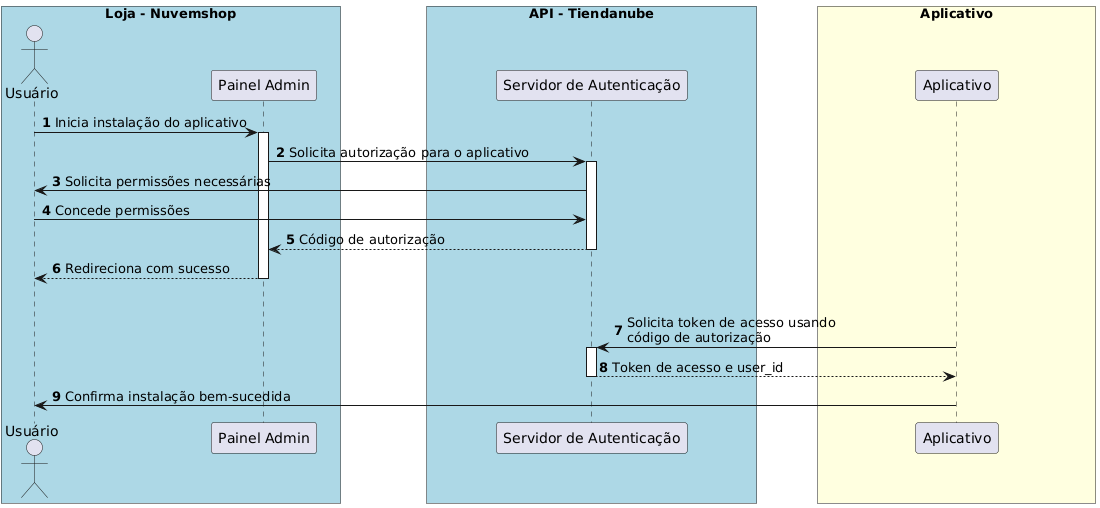
Authorization Flow:
- Installation Start: The user, from the Nuvemshop admin panel, clicks to install the app or directly accesses a specific URL for authorization.
- Permission Request: The user is redirected to a page where they must authorize the scopes the app requests. If previously authorized, this step is skipped.
- Redirection with Authorization Code: After authorization, the user is redirected to the app's redirect URL with an authorization code that expires in 5 minutes.
- Exchange for Access Token: The application uses its credentials and the authorization code to obtain an access token through a POST request to a specific endpoint.
Example Request to Obtain the Access Token:
curl -d '{
"client_id": "123",
"client_secret": "abcdef",
"grant_type": "authorization_code",
"code": "xyz"
}' \
-H 'Content-Type: application/json' \
-X POST "https://www.nuvemshop.com/apps/authorize/token"
Along with the access token, a user_id is provided, which corresponds to the store ID.
This user_id is essential for making requests to the API and can be used to authenticate users of the app on your website.