Extra Info Based on Tags
Display additional product information dynamically based on product tags. This pattern is useful for showing badges, labels, or special notices based on product attributes.
Overview
This example demonstrates how to:
- Read product tags from the store state
- Conditionally render badges based on tag values
- Customize tag configurations with emojis and colors
Tag Badges
A component that displays colorful badges based on product tags. Perfect for highlighting product attributes like "On Sale", "New Arrival", "Organic", etc.
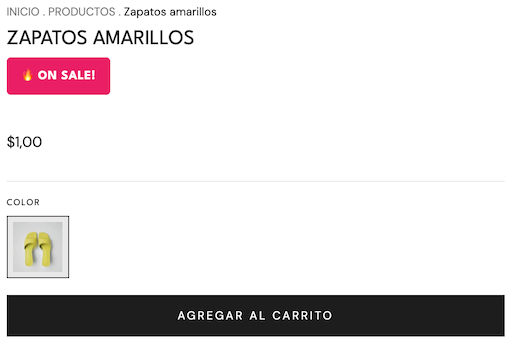
src/components/TagBadges.tsx
import type { NubeComponent } from "@tiendanube/nube-sdk-types";
import { Box, Text, Fragment } from "@tiendanube/nube-sdk-jsx";
import { styled } from "@tiendanube/nube-sdk-ui";

interface TagConfig {
  tag: string;
  label: string;
  emoji?: string;
  background: string;
}

interface TagBadgesProps {
  tags: string | string[];
  customTags?: TagConfig[];
}

const BadgeText = styled(Text)`
  background: #e91e63;
  color: #ffffff;
  padding: 8px 14px;
  border-radius: 4px;
  font-size: 12px;
  font-weight: 700;
  text-transform: uppercase;
  letter-spacing: 0.5px;
`;

const BadgesContainer = styled(Box)`
  display: flex;
  flex-wrap: wrap;
  gap: 8px;
  margin: 8px 0;
`;

// Default tag configurations
const defaultTagConfigs: TagConfig[] = [
  {
    tag: "organic",
    label: "Organic Product",
    emoji: "🌿",
    background: "#2ecc71",
  },
  {
    tag: "sale",
    label: "On Sale!",
    emoji: "🔥",
    background: "#e91e63",
  },
  {
    tag: "limited",
    label: "Limited Edition",
    emoji: "⚡",
    background: "#9b59b6",
  },
  {
    tag: "new",
    label: "New Arrival",
    emoji: "✨",
    background: "#3498db",
  },
  {
    tag: "bestseller",
    label: "Best Seller",
    emoji: "🏆",
    background: "#f39c12",
  },
  {
    tag: "eco",
    label: "Eco-Friendly",
    emoji: "♻️",
    background: "#27ae60",
  },
];

// Helper to normalize tags to array
function normalizeTags(tags: string | string[]): string[] {
  if (Array.isArray(tags)) {
    return tags.map((t) => t.trim().toLowerCase());
  }
  return tags.split(",").map((t) => t.trim().toLowerCase());
}

// Helper to check if product has a specific tag
function hasTag(normalizedTags: string[], tagToFind: string): boolean {
  return normalizedTags.includes(tagToFind.toLowerCase());
}

// Build badges based on tags
function buildTagBadges(
  tags: string | string[],
  customTags?: TagConfig[]
): NubeComponent[] {
  const normalizedTags = normalizeTags(tags);
  const tagConfigs = customTags ?? defaultTagConfigs;
  const badges: NubeComponent[] = [];

  for (const config of tagConfigs) {
    if (hasTag(normalizedTags, config.tag)) {
      const label = config.emoji
        ? `${config.emoji} ${config.label}`
        : config.label;
      badges.push(
        <BadgeText key={config.tag} style={{ background: config.background }}>
          {label}
        </BadgeText>
      );
    }
  }

  return badges;
}

export function TagBadges({ tags, customTags }: TagBadgesProps) {
  const badges = buildTagBadges(tags, customTags);

  if (badges.length === 0) {
    return <Fragment />;
  }

  return <BadgesContainer>{badges}</BadgesContainer>;
}

// Export utilities for advanced usage
export { hasTag, normalizeTags, defaultTagConfigs };
export type { TagConfig };
Usage
src/main.tsx
import type { NubeSDK, ProductPage } from "@tiendanube/nube-sdk-types";
import { TagBadges } from "./components/TagBadges";

// Helper to check if on product page
function isProductPage(page: { type: string }): page is ProductPage {
  return page.type === "product";
}

export function App(nube: NubeSDK) {
  // Listen for page changes to show badges on product pages
  nube.on("page:loaded", (state) => {
    const { page } = state.location;

    // Only act on product pages
    if (isProductPage(page)) {
      const product = page.data.product;
      const tags = product.tags || ""; // e.g., "sale,organic,limited"

      // Only set the slot if there are tags
      if (tags) {
        nube.send("ui:slot:set", () => ({
          ui: {
            slots: {
              after_product_detail_name: <TagBadges tags={tags} />,
            },
          },
        }));
      }
    }
  });
}
Best Practices
- Use consistent tag naming: Establish a tag naming convention in your store
- Keep badges concise: Short labels are easier to read at a glance
- Choose contrasting colors: Ensure badges are visible against the page background
- Limit badge count: Too many badges can be overwhelming; prioritize the most important ones
- Test with various products: Ensure badges display correctly for products with multiple tags
Related
- Extra Info (Product List) - Display content on product grids (home, category, search pages)
- Box - For layout and styling
- Text - For displaying badge labels
- Fragment - For conditional rendering
Help us improve NubeSDK
Found an issue or have a suggestion? Let us know on GitHub.